DockOps API
DockOps has an API so your Pension & Welfare office can connect its existing system to approved member, hours, and contribution records. Real-time updates depend on the connected system’s supported interfaces.

Everything DockOps brings to port operations — from real-time dispatch and finance to member management and mobile access.
Connected Systems. Local Control.
Choose how your Pension & Welfare office connects: the DockOps API, automated or manual reports, or DockOps: Pension & Welfare for the most complete, real-time integration. Keep your existing system connected or bring the office’s workflows into DockOps.
Your local keeps its dispatch, member profiles, payroll analysis, and administration in DockOps. Authorized offices can use the connected records they need, while each fund retains authority over its eligibility rules and benefit decisions.
Your local decides which offices and users can access its records, what they can see, and what they can export. An integration shares only the data your local authorizes.
DockOps has an API so your Pension & Welfare office can connect its existing system to approved member, hours, and contribution records. Real-time updates depend on the connected system’s supported interfaces.
Use automated reports for recurring delivery or generate manual reports on demand. Export the approved records your office needs for contribution review, reconciliation, and follow-up.
For the most complete, real-time integration, use the DockOps: Pension & Welfare module within the same platform. Bring approved member records, work hours, employer contributions, reconciliation, and reporting together without waiting for a separate report handoff.
Connections are configured around each organization’s systems, supported interfaces, and access approved by the local.
Real-time dispatch management, seniority-based staffing, automated timesheets, and check-in/check-off workflows.
View SuiteFlexible online and badge-based check-in with membership windows, authorized call-in override, casuals access control, and real-time notifications.
Gang staffing levels displayed by seniority. Confirms member check-ins with real-time updates and highlights for header selection.
Submission status tracking (Submitted / Pending / Complete), last-submission override logic, and automatic seniority sorting.
Auto-generated timesheets with header selection timers, overage queue management, callback list logic, and certification-based eligibility.
Finalization pop-up display, text notifications, job-site validation via badge scan, and timesheet auto-fill.
Auto-submit for missed deadlines, dispatcher edits and approvals, timekeeper notifications, no-show punishment toggle, and membership status enforcement.
Configure gangs with headers, subheaders, and admin roles. Assign members from the board with role-based permissions and certification requirements.
Create, view, and manage work orders with pre-filled fields, templates, and integrated location mapping.
Maintained in seniority order so members know their place before leaving home. Dispatchers work the same list, replacements are drawn from it, and an alternative can be recorded when the list is exhausted.
Access-controlled check-in for members who cannot check themselves in, such as an authorized call-in. Only the roles a local grants it to can use it, and the action is recorded.
Records for ships, terminals, and stevedoring companies, with vessel assignments tying each work order to the job it belongs to so timesheets and payroll trace back to the right berth.
Live check-in/check-off visibility, work order status, and operational metrics with drill-down into gang and member detail.
Restrict check-in for gangs requiring specific certifications. Members without valid, active credentials are automatically blocked.
Members check in from the dock, roles fill by seniority and certification, and the day's activity becomes a review-ready timesheet — without a paper log in sight.
Morning Shape-Up · East Berth
Live workforce board
47 checked in
Badge, call-in, and mobile confirmations
Identify money shipping companies, cruise lines, and stevedores owe members, unions, and the Pension & Welfare office. Reconcile payments and document shortfalls.
View SuiteSupport Vacation & Holiday Fund offices with hours, employer contribution records, and reporting through direct APIs, automated or manual exports, or DockOps modules, with access approved by the local.
Identify missing or incomplete employer contributions using work records and applicable obligations. DockOps has an API and automated or manual reports for existing office systems; the DockOps: Pension & Welfare module provides the most complete, real-time integration.
Connect payroll and remittance shortfalls to the company responsible for payment. Give union leadership supporting records for collection follow-up.
Compare employer payroll with dispatch and timesheet records to identify unpaid wages and shortfalls in payments owed to members, locals, and the ILA.
Reconcile dues withheld through payroll against amounts employers remit to the local. Keep payment history and collection follow-up tied to the employer responsible.
Manage strike fund contributions, balances, and disbursements with full transparency and reporting for leadership.
Identify the employer responsible, the union or benefit office owed, and the outstanding amount, with records your local can use to pursue payment.
A download built for the timekeeper workflow, kept separate from the end-of-day record so the two do not interfere. The timesheet export stays complete after the board clears.
Exports covering timesheets, member profiles, and certifications with column selection. Download rights are permissioned separately from viewing, so reading a record does not imply bulk export.
Generate financial reports formatted for audit review with complete transaction history and supporting documentation.
Compare payroll and employer remittances with the work and obligations behind them. Document underpayments to members, locals, the ILA, and the Pension & Welfare office so your local can pursue what it is owed.
Employer Payroll Analysis
Interactive ExampleStill Owed by Employers · All Years
$1,197,150
All companies · All recipients
Choose a Year · Select to Drill Down
| Who Owes | Still Owed |
|---|---|
| $299,247 | |
| $239,387 | |
| $215,433 | |
| $179,522 | |
| $143,599 | |
| $119,962 |
Fictional companies and amounts for illustration. Payroll weeks end on Sunday and belong to the month and year of their ending date. No actual findings or recovered payments.
One secure record per member — hours, certifications, history, and status — accessible in real time across web and mobile.
View SuitePersonal, contact, and emergency info centralized with employment details, status tracking, and complete work history.
Track certifications (forklift, tug, pallet jack) with expiration dates, renewal reminders, and automatic expiry flagging.
Upload, store, and manage member documents with configurable types, expiration tracking, and searchable archives.
Uploaded documents go to administrators for review rather than straight onto the record. Profiles show approved documents only, while pending and rejected submissions are retained for history.
Members submit corrections to their own record for administrator approval. The local stays in control of what its records say, and both the request and its outcome are recorded.
An inline grid for updating fields such as years and hours across many members at once, with a preview of the change before it is applied and bulk status changes written to the audit log.
Seniority can be assigned and restructured as a controlled action, so corrections are made inside the system and recorded rather than tracked in a spreadsheet.
Reports surfacing members whose certifications have expired and members with incomplete onboarding, so administrators can act before someone is blocked at the hall.
Members can pre-register for upcoming shifts, view available assignments, and streamline the check-in process.
View real-time logged hours, resolve discrepancies directly, and access assignment history across all gangs with exportable reports.
View and manage disciplinary warnings, access news, events, and training materials, and track onboarding progress.
Display certification abbreviations next to member names on the flow board and gang pages for quick reference during assignments.
Secure biometric login support for fast, passwordless access on supported devices.
Seniority, hours, certifications with their expiry dates, approved documents and assignment history — held once and used across dispatch, payroll and administration rather than duplicated per department.
Member record
Current across web and mobile
Phone
(904) 555-0142
Home port
Jacksonville
Primary role
Crane operator
Emergency
Contact on file
Administrative modules for discipline, grievances, machinery checks, and anonymous feedback — plus announcements and audit logging.
View SuiteDocuments employee misconduct with a digital workflow for review, signatures, and notifications to all involved parties.
Formal complaint documentation with automated workflow, role-based access, and calendar integration for hearings.
Pre-use condition reporting with streamlined approval workflows and notifications to stevedores and the union hall.
Track time entry changes with corrections, approvals, and automated documentation and notifications.
Personal, contact, and emergency info centralized with certification tracking and cross-suite integration.
Submit feedback anonymously or by name through a secure channel. Union hall review and feedback options included.
Publish announcements to all members via the web platform and push them directly to mobile devices.
Real-time notifications delivered to iOS and Android devices with pop-up alerts and full notification history.
Permissions set per module and per action — create, read, update, delete, list, menu visibility, download, and view-your-own-only. Status changes are a separate permission from editing, and users can hold multiple roles.
Surveys for gathering member feedback across the local, alongside the direct Voice Your Concerns channel.
Dispatcher rotations and vessel dates held in the system, which members can add to the calendar on their own device from the mobile app.
Org-wide appearance settings, including the palette distinguishing members from non-members, so the system reads the way the local expects.
Complete audit trail of every database change — who changed what, when, with old and new values recorded.
Secure SMS-based login so members can authenticate quickly without managing passwords.
Streamlined onboarding process with digital document collection, approvals, and member setup.
Grievances, discipline, documents and member concerns move through role-based review. Each step is recorded with who did it and when, which is what makes the history defensible months later.
Bridge · Case workflow
Grievance GR-1048
Grievance
A. Rivera · Updated just now
Machinery check
D. Nelson · Updated just now
Time adjustment
J. Marshall · Updated just now
Access DockOps from any device — web, iOS, and Android. The same data, the same workflows, wherever you are.
Full DockOps experience on iPhone and iPad, available on the Apple App Store.
Full DockOps experience on Android phones and tablets, available on Google Play.
Full-featured web application accessible from any modern browser for leadership and admin workflows.
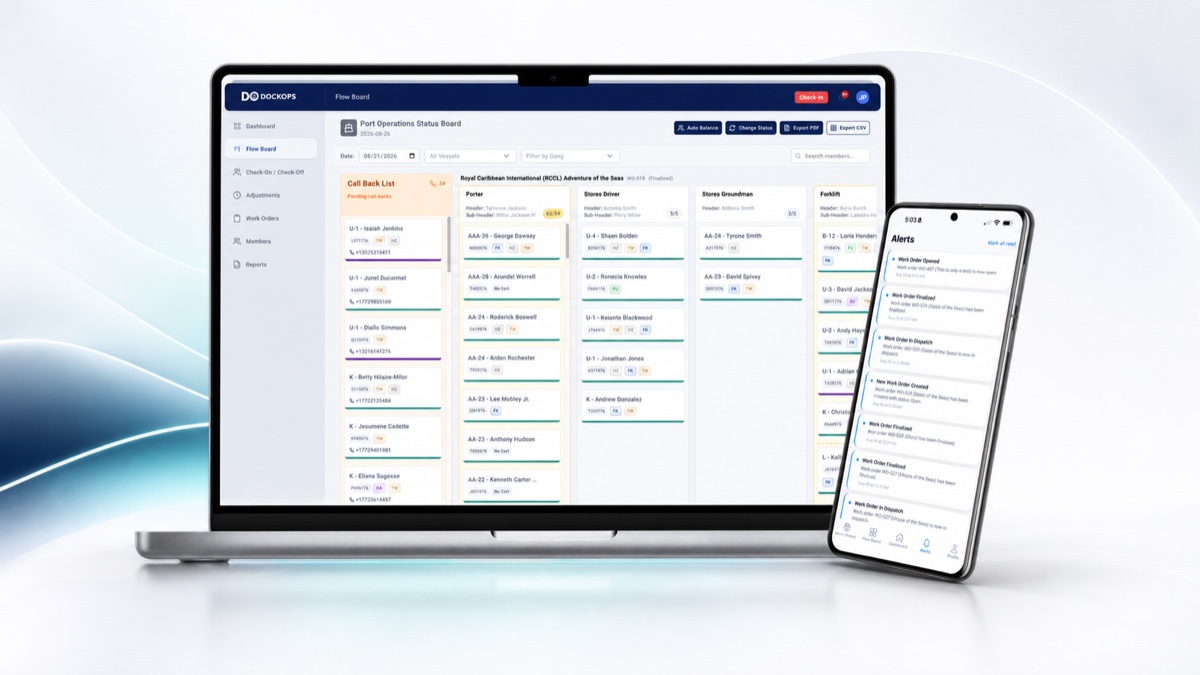
View and manage the dispatch flow board directly from your phone with the same real-time data as the web app.
Receive push notifications and view announcements on your mobile device, with a full history log.
Checked-in members are texted when a work order is finalized, alongside push and in-app notification, so the day closes out without anyone having to chase confirmation.
Headers, subheaders, and admins can manage gang assignments from their mobile device.
The full platform on the web for leadership and administration, and native apps in the pocket of every member on the dock — working from the same records, not a synced copy.

Schedule a demo to see how these features work together for your operation.